> For the complete documentation index, see [llms.txt](https://dev.ubidots.com/llms.txt). Markdown versions of documentation pages are available by appending `.md` to page URLs; this page is available as [Markdown](https://dev.ubidots.com/dashboards-and-widgets/gauge.md).
# Gauge
Visualize single-value data in Ubidots in the form of Gauge charts
The Gauge widget provides a clear and intuitive way to visualize single-value metrics. It is ideal for representing KPIs, performance scores, percentages, or real-time sensor readings. The widget lets users quickly assess the current state of a variable against defined ranges.
For a basic overview of the widget, visit [this article](https://help.ubidots.com/en/articles/8183881-ubidots-basics-widgets), which covers the basics of setting up a Gauge widget.
This section covers only the advanced features of the Gauge widget.
## ECharts configuration
{% hint style="warning" %}
This option is only available to Enterprise users.
{% endhint %}
[ECharts](https://echarts.apache.org/en/index.html) is a powerful open-source visualization library designed to create interactive and customizable charts. ECharts provides extensive customization options that let you tailor the appearance and behavior of gauges to fit specific requirements.
The Gauge widget is built on top of the ECharts library. This gives users access to all features provided by the library through the **ECharts configuration** option in the **APPEARANCE** tab:
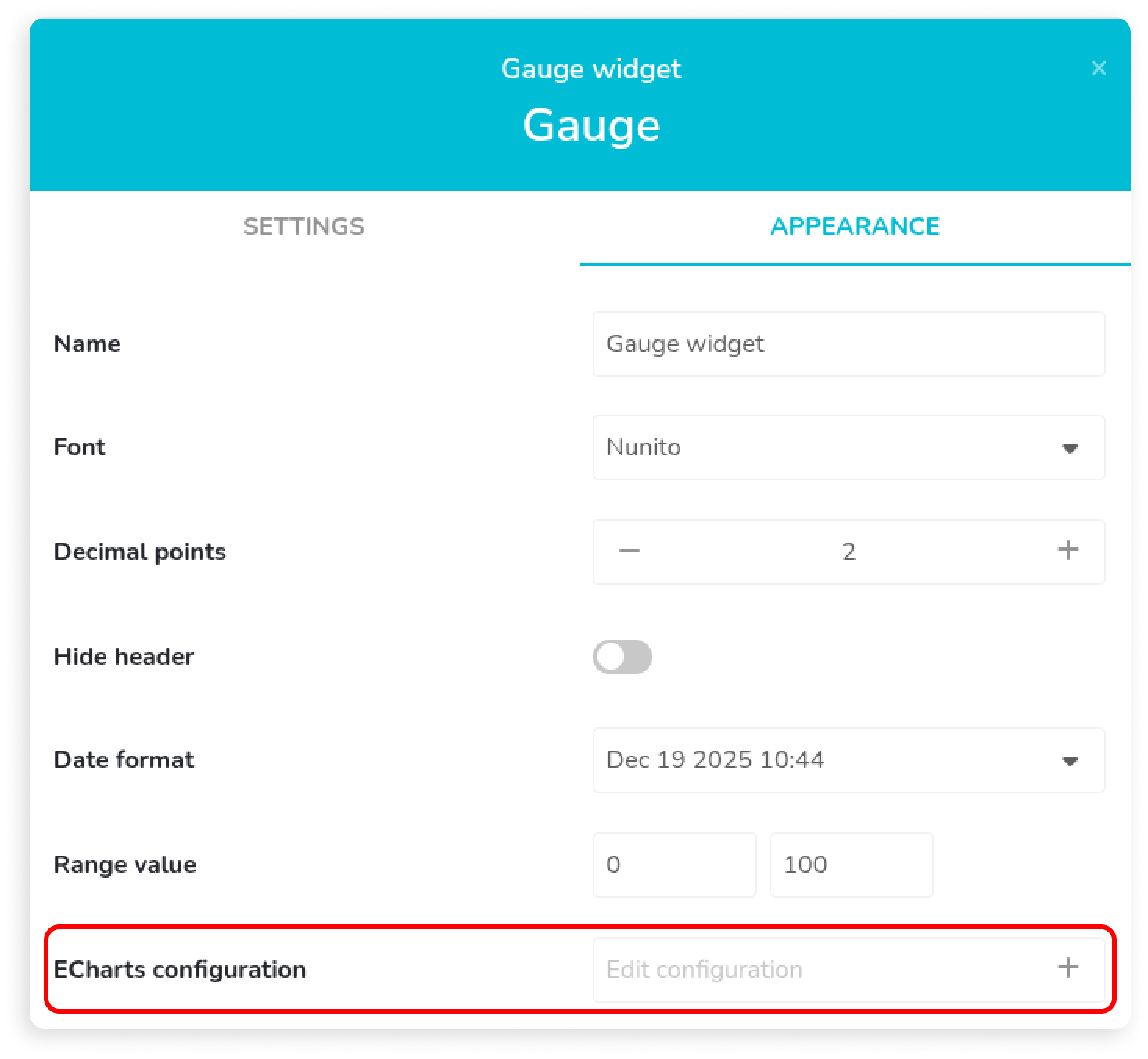 After you click the option, a large drawer opens from the left and shows the [ECharts options JSON](https://echarts.apache.org/en/option.html#title). It maps all fields available in the UI and also provides an editing environment where users can take full advantage of the available series types.
{% hint style="info" %}
All fields exposed through the UI are mapped bidirectionally. This means that if you make a change in the UI, it is reflected in the ECharts options JSON, and vice versa.
{% endhint %}
After you click the option, a large drawer opens from the left and shows the [ECharts options JSON](https://echarts.apache.org/en/option.html#title). It maps all fields available in the UI and also provides an editing environment where users can take full advantage of the available series types.
{% hint style="info" %}
All fields exposed through the UI are mapped bidirectionally. This means that if you make a change in the UI, it is reflected in the ECharts options JSON, and vice versa.
{% endhint %}
 ## Examples
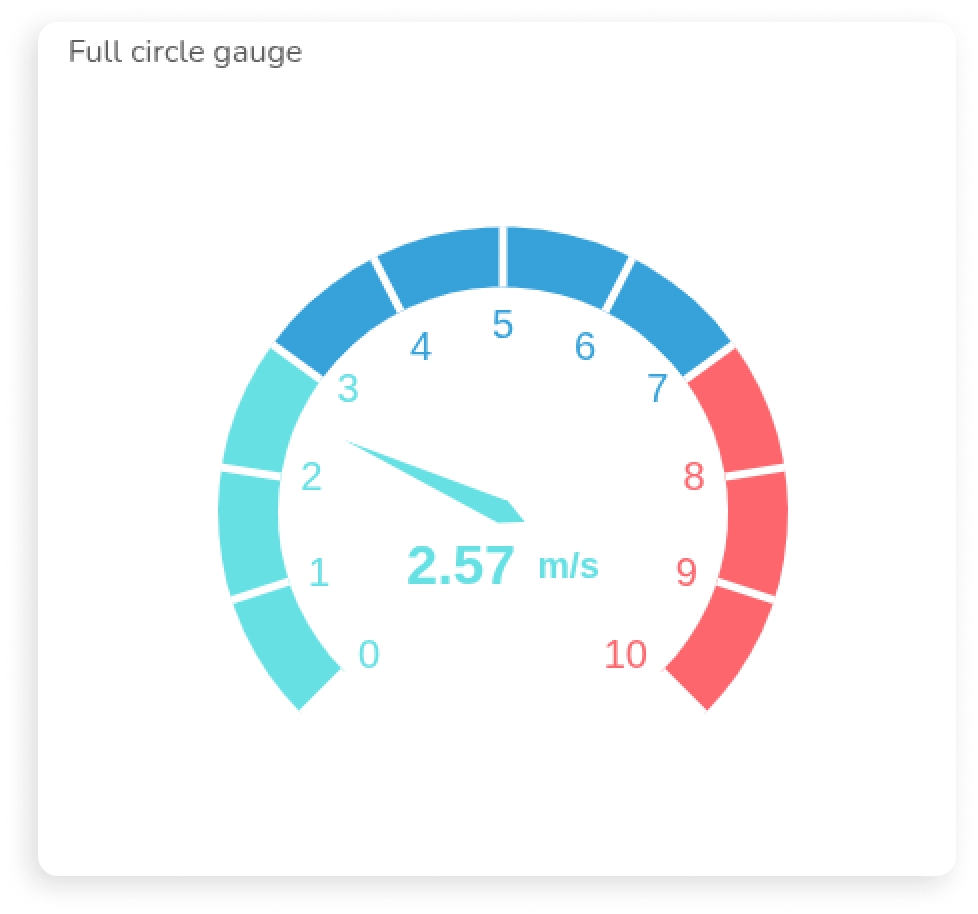
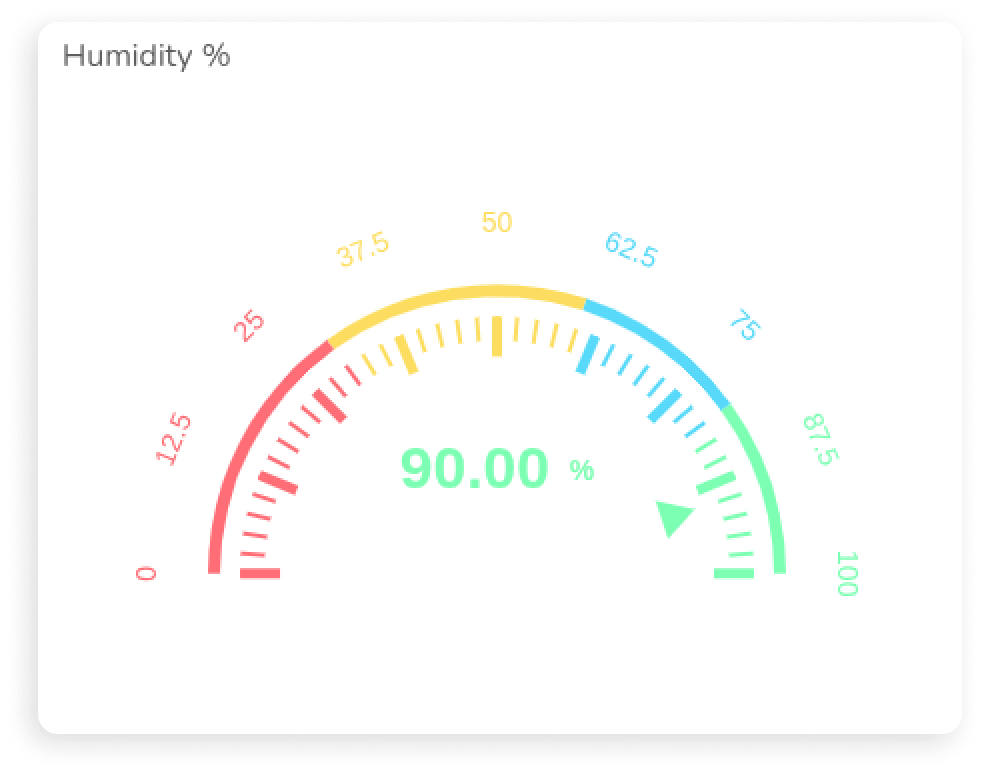
The examples below use the ECharts configuration option to produce the results shown. Without this advanced option, you cannot get the same visualization using only the fields available in the UI.
## Full circle Gauge
## Examples
The examples below use the ECharts configuration option to produce the results shown. Without this advanced option, you cannot get the same visualization using only the fields available in the UI.
## Full circle Gauge

JSON Example
```json
{
"media": [
{
"query": {
"maxHeight": 165
},
"option": {
"series": [
{
"center": [
"50%",
"50%"
],
"radius": "80%",
"axisLine": {
"lineStyle": {
"width": 24
}
}
},
{
"center": [
"50%",
"50%"
],
"radius": "80%",
"progress": {
"width": 12
},
"detail": {
"rich": {
"unit": {
"fontSize": 8,
"lineHeight": 10
},
"value": {
"fontSize": 10,
"lineHeight": 12
}
},
"offsetCenter": [
0,
"6%"
],
"width": 62,
"height": 20,
"borderRadius": 12
}
}
]
}
},
{
"query": {
"maxAspectRatio": 1
},
"option": {
"series": [
{},
{
"detail": {
"rich": {
"unit": {
"fontSize": 10
},
"value": {
"fontSize": 14
}
},
"offsetCenter": [
0,
"8%"
]
}
}
]
}
},
{
"query": {
"maxAspectRatio": 1.12,
"minAspectRatio": 1
},
"option": {
"series": [
{},
{
"detail": {
"rich": {
"unit": {
"fontSize": 11
},
"value": {
"fontSize": 18
}
},
"offsetCenter": [
0,
"8%"
]
}
}
]
}
}
],
"series": [
{
"type": "gauge",
"min": 0,
"max": 100,
"startAngle": 90,
"endAngle": -270,
"center": [
"50%",
"50%"
],
"radius": "86%",
"pointer": {
"show": false
},
"progress": {
"show": false
},
"axisLine": {
"lineStyle": {
"width": 32,
"color": [
[
1,
"#E9EDF2"
]
]
}
},
"axisTick": {
"show": false
},
"splitLine": {
"show": false
},
"axisLabel": {
"show": false
},
"title": {
"show": false
},
"detail": {
"show": false
}
},
{
"type": "gauge",
"min": 0,
"max": 100,
"startAngle": 90,
"endAngle": -270,
"center": [
"50%",
"50%"
],
"radius": "86%",
"pointer": {
"show": false
},
"axisLine": {
"lineStyle": {
"width": 0
}
},
"progress": {
"clip": false,
"show": true,
"width": 16,
"roundCap": true,
"itemStyle": {
"borderColor": "#464646",
"borderWidth": 1
}
},
"axisTick": {
"show": false
},
"splitLine": {
"show": false
},
"axisLabel": {
"show": false
},
"title": {
"show": false
},
"detail": {
"rich": {
"unit": {
"padding": [
0,
0,
0,
2
],
"fontSize": "10%",
"fontWeight": 400,
"lineHeight": 22
},
"value": {
"fontSize": "20%",
"fontWeight": "bold",
"lineHeight": 22
}
},
"formatter": "{value|{value}}{unit| {unit}}",
"offsetCenter": [
0,
"10%"
],
"valueAnimation": true,
"width": 70,
"height": 24,
"borderWidth": 1,
"borderRadius": 14,
"color": "inherit",
"borderColor": "inherit"
}
}
]
}
```
## Speed meter gauge
JSON Example
```json
{
"media": [
{
"query": {
"maxHeight": 180
},
"option": {
"series": [
{
"detail": {
"rich": {
"unitFormatter": {
"padding": [
0,
0,
0,
4
],
"fontSize": 12,
"lineHeight": 20
},
"valueFormatter": {
"fontSize": 18,
"fontWeight": "bold",
"lineHeight": 20
}
},
"show": true,
"formatter": "{valueFormatter|{value}}{unitFormatter| {unit}}",
"offsetCenter": [
0,
"10%"
],
"valueAnimation": true
},
"pointer": {
"show": false
},
"axisLine": {
"lineStyle": {
"width": 14
}
},
"axisTick": {
"show": false
},
"axisLabel": {
"show": false
},
"splitLine": {
"show": false
}
}
]
}
},
{
"query": {
"maxHeight": 260
},
"option": {
"series": [
{
"detail": {
"rich": {
"unitFormatter": {
"padding": [
0,
0,
0,
4
],
"fontSize": 14,
"lineHeight": 24
},
"valueFormatter": {
"fontSize": 22,
"fontWeight": "bold",
"lineHeight": 24
}
},
"show": true,
"color": "inherit",
"formatter": "{valueFormatter|{value}}{unitFormatter| {unit}}",
"offsetCenter": [
0,
"15%"
],
"valueAnimation": true
},
"pointer": {
"show": true,
"itemStyle": {
"color": "auto"
}
},
"axisLine": {
"lineStyle": {
"width": 22
}
},
"axisTick": {
"show": true,
"length": 6,
"distance": -22,
"lineStyle": {
"color": "#fff",
"width": 2
},
"splitNumber": 1
},
"axisLabel": {
"show": false
},
"splitLine": {
"show": true,
"length": 18,
"distance": -22,
"lineStyle": {
"color": "#fff",
"width": 3
}
}
}
]
}
},
{
"query": {
"maxAspectRatio": 1.05
},
"option": {
"series": [
{
"detail": {
"rich": {
"unitFormatter": {
"fontSize": 16,
"lineHeight": 26
},
"valueFormatter": {
"fontSize": 24,
"lineHeight": 26
}
},
"offsetCenter": [
0,
"18%"
]
},
"axisLabel": {
"show": true,
"color": "inherit",
"distance": 26,
"fontSize": 14
}
}
]
}
}
],
"series": [
{
"max": 10,
"min": 0,
"type": "gauge",
"detail": {
"rich": {
"unitFormatter": {
"padding": [
0,
0,
0,
6
],
"fontSize": 18,
"lineHeight": 30
},
"valueFormatter": {
"fontSize": 28,
"fontWeight": "bold",
"lineHeight": 30
}
},
"show": true,
"color": "inherit",
"formatter": "{valueFormatter|{value}}{unitFormatter| {unit}}",
"offsetCenter": [
0,
"20%"
],
"valueAnimation": true
},
"pointer": {
"show": true,
"itemStyle": {
"color": "auto"
}
},
"axisLine": {
"lineStyle": {
"color": [
[
0.3,
"#67e0e3"
],
[
0.7,
"#37a2da"
],
[
1,
"#fd666d"
]
],
"width": 30
}
},
"axisTick": {
"show": true,
"length": 8,
"distance": -30,
"lineStyle": {
"color": "#fff",
"width": 2
},
"splitNumber": 1
},
"axisLabel": {
"show": true,
"color": "inherit",
"distance": 40,
"fontSize": 20
},
"splitLine": {
"show": true,
"length": 30,
"distance": -30,
"lineStyle": {
"color": "#fff",
"width": 4
}
}
}
]
}
```
## Pressure gauge

JSON Example
```json
{
"media": [
{
"query": {
"maxHeight": 165
},
"option": {
"series": [
{
"center": [
"50%",
"66%"
],
"detail": {
"rich": {
"u": {
"padding": [
0,
0,
0,
2
],
"fontSize": 9,
"lineHeight": 16
},
"v": {
"fontSize": 14,
"fontWeight": "bold",
"lineHeight": 16
}
},
"formatter": "{v|{value}}{u| {unit}}",
"borderWidth": 0,
"offsetCenter": [
0,
"8%"
]
},
"radius": "82%",
"axisLine": {
"lineStyle": {
"width": 14
}
},
"axisTick": {
"length": 4,
"distance": -22,
"lineStyle": {
"color": "#999999",
"width": 1
}
},
"axisLabel": {
"color": "#999999",
"distance": -18,
"fontSize": 8
},
"splitLine": {
"length": 8,
"distance": -26,
"lineStyle": {
"color": "#999999",
"width": 2
}
}
}
]
}
}
],
"series": [
{
"max": 2000,
"min": 0,
"type": "gauge",
"title": {
"show": false
},
"anchor": {
"show": false
},
"center": [
"50%",
"70%"
],
"detail": {
"rich": {
"u": {
"padding": [
0,
0,
0,
6
],
"fontSize": 14,
"lineHeight": 32
},
"v": {
"fontSize": 30,
"fontWeight": "bolder",
"lineHeight": 32
}
},
"color": "inherit",
"formatter": "{v|{value}}{u| {unit}}",
"borderWidth": 0,
"offsetCenter": [
0,
"-8%"
],
"valueAnimation": true
},
"radius": "84%",
"pointer": {
"show": false
},
"axisLine": {
"lineStyle": {
"color": [
[
1,
"#E9EDF2"
]
],
"width": 22
}
},
"axisTick": {
"length": 6,
"distance": -30,
"lineStyle": {
"color": "#999999",
"width": 2
},
"splitNumber": 5
},
"endAngle": -20,
"progress": {
"show": true,
"width": 22,
"itemStyle": {
"color": "#FFAB91"
}
},
"axisLabel": {
"color": "#999999",
"distance": -24,
"fontSize": 14
},
"splitLine": {
"length": 10,
"distance": -34,
"lineStyle": {
"color": "#999999",
"width": 3
}
},
"startAngle": 200,
"splitNumber": 10
},
{
"max": 2000,
"min": 0,
"type": "gauge",
"center": [
"50%",
"70%"
],
"detail": {
"show": false
},
"radius": "84%",
"pointer": {
"show": false
},
"axisLine": {
"show": false
},
"axisTick": {
"show": false
},
"endAngle": -20,
"progress": {
"show": true,
"width": 6,
"itemStyle": {
"color": "#FD7347"
}
},
"axisLabel": {
"show": false
},
"splitLine": {
"show": false
},
"startAngle": 200
}
]
}
```
## Humidity percentage
JSON Example
```json
{
"series": [
{
"type": "gauge",
"min": 0,
"max": 100,
"startAngle": 180,
"endAngle": 0,
"splitNumber": 8,
"center": [
"50%",
"75%"
],
"radius": "90%",
"axisLine": {
"lineStyle": {
"width": 6,
"color": [
[
0.3,
"#FF6E76"
],
[
0.6,
"#FDDD60"
],
[
0.8,
"#58D9F9"
],
[
1,
"#7CFFB2"
]
]
}
},
"pointer": {
"icon": "path://M12.8,0.7l12,40.1H0.7L12.8,0.7z",
"length": "12%",
"width": 20,
"offsetCenter": [
0,
"-60%"
],
"itemStyle": {
"color": "auto"
}
},
"axisTick": {
"length": 12,
"lineStyle": {
"color": "auto",
"width": 2
}
},
"splitLine": {
"length": 20,
"lineStyle": {
"color": "auto",
"width": 5
}
},
"axisLabel": {
"color": "auto",
"fontSize": 14,
"distance": -60,
"rotate": "tangential",
"formatter": "{value}"
},
"title": {
"show": false
},
"detail": {
"fontSize": 28,
"valueAnimation": true,
"offsetCenter": [
0,
"-35%"
],
"color": "inherit",
"rich": {
"v": {
"fontSize": 30,
"fontWeight": "bold",
"lineHeight": 36
},
"u": {
"fontSize": 14,
"lineHeight": 36,
"padding": [
0,
0,
0,
6
]
}
},
"formatter": "{v|{value}}{u| {unit}}"
}
}
]
}
```
---
# Agent Instructions
This documentation is published with GitBook. GitBook is the documentation platform designed so that both humans and AI agents can read, navigate, and reason over technical content effectively. Learn more at gitbook.com.
## Querying This Documentation
If you need additional information that is not directly available in this page, you can query the documentation by asking a question.
Perform an HTTP GET request on the following URL with the `ask` and `goal` query parameters:
```
GET https://dev.ubidots.com/dashboards-and-widgets/gauge.md?ask=&goal=
```
`ask` is the immediate question: it should be specific, self-contained, and written in natural language.
`goal` is what the user is ultimately trying to achieve, the reason they need the answer. Sharing it helps GitBook give you a better, more relevant answer. A goal is most helpful when it describes the outcome the user wants rather than restating the question. For example, with `ask=how do I create an API token`, a goal like `automate deployments from our CI pipeline` lets GitBook tailor the answer to that use case.
The response will contain a direct answer to the question and relevant excerpts and sources from the documentation.
Use this mechanism when the answer is not explicitly present in the current page, you need clarification or additional context, or you want to retrieve related documentation sections.